Going Codeless with AWS API Gateway and Step Functions
This idea came out of nowhere: what if I could take a fully coded microservice and rebuild it with almost no code at all? Bold? Definitely. Maybe even a little reckless. But it felt like the kind of challenge worth chasing. With AWS SAM, API Gateway, and Step Functions in hand, I wanted to see if I could strip a simple TypeScript-based SAM microservice down to its bare bones. What I didn’t expect was how many twists, hurdles, and little lightbulb moments I’d run into along the way. Here’s what happened when I went all in on serverless simplicity.
The Spark Behind the Journey
The motivation was pretty simple: write less code, make life easier. Fewer lines to maintain means fewer bugs, less technical debt, and more time to solve actual business problems. I’d spent too many hours babysitting codebases that did little more than keep the lights on — especially when AWS was rolling out new native features every other month.
There was another reason too. We always got stuck in language wars when building microservices. In a Java-heavy team, Java was the safe default. Our DevSecOps folks leaned towards Go for its performance, while others argued for TypeScript because of its tight fit with AWS serverless. These debates burned time and split the way we built things.
Going down the codeless path looked like a way out. No language lock-in meant no endless debates, easier collaboration, and services that were accessible to everyone on the team.
And then there’s the cold start issue with Lambda. Sure, most users don’t notice those few seconds of delay — but to me, it felt wasteful. I couldn’t help but think: What if I could push AWS serverless to the edge and build something truly lean?Something without custom code, without language baggage, and without those pesky cold starts.
Setting the Stage: The Original Microservice
To appreciate the magnitude of this endeavour, let’s rewind to where it all began — the GenAI-Media-To-Text microservice. This was a fresh addition to our platform, designed to infuse AI capabilities by generating titles and descriptions for social media from video clips.
Initially, this service was built using AWS SAM with TypeScript. The API Gateway routed requests to Lambda functions, which housed the core business logic. Here’s a snippet of the original TypeScript code:
export const lambdaHandler = async (event: APIGatewayProxyEvent): Promise<APIGatewayProxyResult> => {
    try {
        // 1 - Validate JWT
        let jwtResult: JwtResult;
        try {
            jwtResult = await GrabyoJWTUtils.getInstance().extractAndValidateGrabyoJwt(event);
        } catch (error) {
           ...
        }

        // 2 - Use the RequestValidator to validate the incoming request
        const validator = RequestValidator.getInstance();
        const { isValid, error, value } = validator.validateRequest(event, createJobSchema);

        ...

        // 3 - Request pres-signed URL media
        finalMediaUrl = await uDVRManager.getInstance().getuDVRPreSignedUrl(params, jwtResult.rawToken);

        ...

        // 4 - Request AI job
        const aiResponse = await AIManager.getInstance().createTranscribeJob(finalMediaUrl);

        return {
            statusCode: 200,
            body: aiResponse,
        };
    } catch (err) {
        console.log(err);
        return {
            statusCode: 500,
            body: JSON.stringify({
                message: 'some error happened',
            }),
        };
    }
};
Let’s rewind for a moment to where this all kicked off — the GenAI-Media-To-Text microservice. We wanted to spice up our platform by adding a bit of AI magic: automatically generating titles and descriptions for social media straight from video clips.
At first, the service followed a pretty standard playbook: built with AWS SAM and TypeScript. API Gateway would catch the requests and hand them over to Lambda functions, where the business logic lived. Clean, reliable, and code-heavy.
Here’s a quick look at what that original TypeScript setup looked like:
And the corresponding YAML configuration:
...

Resources:
  ApiGatewayApi:
    Type: AWS::Serverless::Api
    Properties:
      StageName: prod
      TracingEnabled: true
    Metadata:
      SamResourceId: ApiGatewayApi

  ApiCustomDomain:
    ...
  ApiCustomDomainMapping:
    ...
  ApiGatewayApiDnsRecord:
    ...

  CreateJobFunction:
    Properties:
      CodeUri: src/
      Handler: CreateJob.lambdaHandler
      Runtime: nodejs20.x
      Architectures:
        - x86_64
      Environment:
        Variables:
          ...
      Policies:
        ...
      Events:
        CreateJob:
          Type: Api
          Properties:
            RestApiId:
              Ref: ApiGatewayApi
            Path: /jobs
            Method: post
    Metadata: # Manage esbuild properties
      BuildMethod: esbuild
      BuildProperties:
        Minify: true
        Target: es2020
        Sourcemap: true
        EntryPoints:
          - CreateJob.ts

  GetJobFunction:
    Properties:
      CodeUri: src/
      Handler: GetJob.lambdaHandler
      Runtime: nodejs20.x
      Architectures:
        - x86_64
      Environment:
        Variables:
          ...
      Policies:
        ...
      Events:
        GetJob:
          Type: Api
          Properties:
            RestApiId:
              Ref: ApiGatewayApi
            Path: /jobs/{id}
            Method: get
    Metadata: # Manage esbuild properties
      BuildMethod: esbuild
      BuildProperties:
        Minify: true
        Target: es2020
        Sourcemap: true
        EntryPoints:
          - GetJob.ts

  ApplicationResourceGroup:
    Type: AWS::ResourceGroups::Group
    Properties:
      Name:
        Fn::Sub: ApplicationInsights-SAM-${AWS::StackName}
      ResourceQuery:
        Type: CLOUDFORMATION_STACK_1_0
  ApplicationInsightsMonitoring:
    Type: AWS::ApplicationInsights::Application
    Properties:
      ResourceGroupName:
        Ref: ApplicationResourceGroup
      AutoConfigurationEnabled: "true"
Outputs:
  JobsAPI:
    Description: API Gateway endpoint URL for Prod stage for Jobs
    Value: !Sub "https://${APIDomainName}/jobs/"
  CreateJobFunction:
    Description: CreateJobFunction ARN
    Value: !GetAtt CreateJobFunction.Arn
  GetJobFunction:
    Description: GetJobFunction ARN
    Value: !GetAtt GetJobFunction.Arn
The Lambda function performed several key tasks:
- Validate the JWT to authenticate users.
- Validate incoming parameters.
- Generate a pre-signed URL.
- Send a request to the AI service.
- Process the AI service response and send it back.
While functional, I couldn’t shake the feeling that there was a more efficient way to achieve the same results.
Step 1: Offloading Logic to Step Functions
The first step of my journey was to offload some of the business logic to AWS Step Functions. The idea was to replace the direct call to the AI service and the parsing of the API request within the Lambda function with a Step Function that could handle these tasks independently.
To implement this change, we removed these lines of code:
...
// 4 - Request AI job
        const aiResponse = await AIManager.getInstance().createTranscribeJob(finalMediaUrl);

        return {
            statusCode: 200,
            body: aiResponse,
        };
...
And added these lines:
...
        // 4 - Start the Step Function execution synchronously
        const command = new StartSyncExecutionCommand({
            stateMachineArn: process.env.STEP_FUNCTION_ARN, // Make sure this is an Express workflow ARN
            input: JSON.stringify({
                "mediaUrl": finalMediaUrl
            })
        });
        const sfnClient = new SFNClient({});
        const response = await sfnClient.send(command);
        // Parse the output from the Step Function
        const stepFunctionOutput = JSON.parse(response.output || '{}');

        return {
            statusCode: stepFunctionOutput.statusCode,
            body: stepFunctionOutput.body,
        };
...
We also updated the Lambda’s SAM template to include the required IAM permissions to call the Step Function:
...
        - Statement:
            - Sid: CallStepFunction
              Effect: Allow
              Action:
                - states:StartExecution
                - states:StartSyncExecution
              Resource:
                - !GetAtt CreateJobStateMachine
...
In addition, we needed to define the new Step Function in our SAM template:
...

Resources:
  ########################
  ## GENERIC COMPONENTS ##
  ########################
  EventBridgeConnection:
    Type: "AWS::Events::Connection"
    Properties:
      Name: !Sub "${ParentStackName}-aiservice-credentials"
      Description: "The credentials to the AI service API"
      AuthorizationType: API_KEY
      AuthParameters:
        ApiKeyAuthParameters:
          ApiKeyName: X-API-Key
          ApiKeyValue: !Sub "{{resolve:secretsmanager:${SecretsManagerAIServiceAPIKey}:SecretString}}"

  StateMachineRole:
    Type: AWS::IAM::Role
    Properties:
      AssumeRolePolicyDocument:
        Version: "2012-10-17"
        Statement:
          - Effect: Allow
            Principal:
              Service: states.amazonaws.com
            Action: "sts:AssumeRole"
      Policies:
        - PolicyName: InvokeHTTPCall
          PolicyDocument:
            Version: "2012-10-17"
            Statement:
              - Effect: Allow
                Action:
                  - "states:InvokeHTTPEndpoint"
                Resource: "XX"
        - PolicyName: RetrieveCredentials
          PolicyDocument:
            Version: "2012-10-17"
            Statement:
              - Effect: Allow
                Action:
                  - "events:RetrieveConnectionCredentials"
                Resource: !GetAtt EventBridgeConnection.Arn
              - Effect: Allow
                Action:
                  - "secretsmanager:GetSecretValue"
                  - "secretsmanager:DescribeSecret"
                Resource: !GetAtt EventBridgeConnection.SecretArn
        - PolicyName: StepFunctionsCloudWatchLogs
          PolicyDocument:
            Version: "2012-10-17"
            Statement:
              - Effect: Allow
                Action:
                  - "logs:CreateLogDelivery"
                  - "logs:GetLogDelivery"
                  - "logs:UpdateLogDelivery"
                  - "logs:DeleteLogDelivery"
                  - "logs:ListLogDeliveries"
                  - "logs:PutResourcePolicy"
                  - "logs:DescribeResourcePolicies"
                  - "logs:DescribeLogGroups"
                Resource: "XXX"
        - PolicyName: StepFunctionsExecution
          PolicyDocument:
            Version: "2012-10-17"
            Statement:
              - Effect: Allow
                Action:
                  - "states:StartExecution"
                  - "states:StopExecution"
                  - "states:DescribeExecution"
                Resource: "XXX"

  ################
  ## CREATE JOB ##
  ################
  CreateJobStateMachine:
    Type: AWS::Serverless::StateMachine
    Properties:
      Name: !Sub "${ParentStackName}-create-job"
      DefinitionUri: api-create-job.json
      Type: EXPRESS
      Logging:
        Destinations:
          - CloudWatchLogsLogGroup:
              LogGroupArn: !GetAtt CreateJobStateMachineLogGroup.Arn
        ...
      Role: !GetAtt StateMachineRole.Arn
      DefinitionSubstitutions:
        EventBridgeConnectionArn: !GetAtt EventBridgeConnection.Arn

  CreateJobStateMachineLogGroup:
    Type: AWS::Logs::LogGroup
    Properties:
      LogGroupName: !Sub "/aws/vendedlogs/states/${ParentStackName}-create-job"
      RetentionInDays: 7
...
The new Step Function orchestrated the workflow and looked like this:
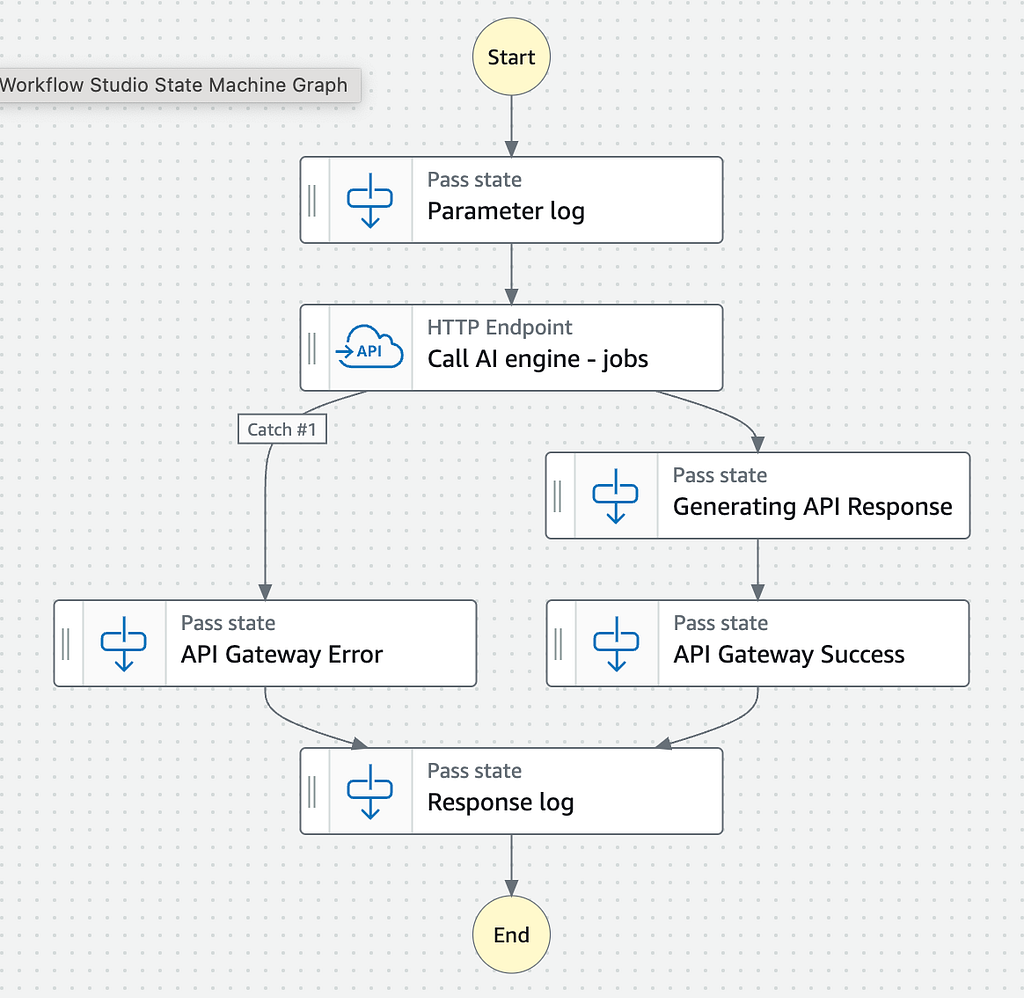
A few important points about this change:
- Defining a New IAM Role: We had to create a new IAM role to allow the Step Function to perform its actions. This role grants the necessary permissions for the Step Function to interact with other AWS services and resources.
- EventBridge Connection for Third-Party API Calls: Calling a third-party API from within the Step Function required including the API token in an EventBridge connection. This is a security requirement for Step Functions when interacting with external services.
- Choosing the Right Step Function Type: A critical consideration was the choice between Step Function types. To handle API requests synchronously, it’s essential to use the Express Workflow, as the Standard Workflow is intended for asynchronous tasks.
- Manual Creation of CloudWatch Logs: Because the Step Function is asynchronous, we had to manually create the CloudWatch Logs configuration. This is something that AWS SAM would automatically handle if the Step Function were a Standard Workflow.
This move not only offloaded significant logic from the Lambda function but also set the stage for a more modular and efficient architecture. By delegating responsibilities to the Step Function, we reduced the complexity within the Lambda and leveraged AWS’s orchestration capabilities to manage the workflow more effectively.
Step 2: Moving JWT Validation to API Gateway
Next up was the JWT validation. Originally performed within a Lambda function, this step added unnecessary latency and contributed to cold starts. I needed a better solution.
Enter the Lambda authorizer in API Gateway. By offloading JWT validation to API Gateway, authentication became decoupled from the core business logic. This shift meant that only authenticated requests would reach the Step Function, enhancing both security and efficiency.
The API Gateway authorizer was configured in the SAM template:
...
Resources:
  ApiGatewayApi:
    Type: AWS::Serverless::Api
    Properties:
      StageName: prod
      TracingEnabled: true
      # ⭐️ LAMBDA AUTHORIZER
      Auth:
        DefaultAuthorizer: GenAIMediaToTextAuthorizer
        Authorizers:
          GenAIMediaToTextAuthorizer:
            FunctionPayloadType: REQUEST
            FunctionArn: !GetAtt GenAiMediaToTextAuthorizerFunction.Arn
            Identity:
              ReauthorizeEvery: 0
...
   GenAiMediaToTextAuthorizerFunction:
    Type: AWS::Serverless::Function
    Properties:
      CodeUri: src/
      Handler: LambdaAuthorizer.lambdaHandler
      Runtime: nodejs20.x
      Architectures:
        - x86_64
      ...
...
This is the code of the new GenAiMediaToTextAuthorizerFunction:
export const lambdaHandler = async (event: APIGatewayRequestAuthorizerEvent): Promise<APIGatewayAuthorizerResult> => {

    // Validate JWT
    let jwtResult: JwtResult;
    try {
        jwtResult = await GrabyoJWTUtils.getInstance().extractAndValidateGrabyoJwt(event);
    } catch (error) {
        console.error('JWT validation failed:', error);
        return {
            principalId: 'user',
            policyDocument: {
                Version: '2012-10-17',
                Statement: [
                    {
                        Action: 'execute-api:Invoke',
                        Effect: 'Deny',
                        Resource: event.methodArn,
                    },
                ],
            }
        };
    };

    return {
        principalId: 'user',
        policyDocument: {
            Version: '2012-10-17',
            Statement: [
                {
                    Action: 'execute-api:Invoke',
                    Effect: 'Allow',
                    Resource: event.methodArn,
                },
            ],
        },
        context: {
            "organizationId": jwtResult.payload.organizationId,
            "userId": jwtResult.payload.sub
        }
    };
}
With this change, we can skip entirely the JWT validation in the initial lambda. This is the code removed:
// 1 - Validate JWT
let jwtResult: JwtResult;
try {
    jwtResult = await GrabyoJWTUtils.getInstance().extractAndValidateGrabyoJwt(event);
} catch (error) {
   ...
}
A couple of key insights emerged from this transition:
- Policy Responses: The Lambda authorizer needed to respond with a policy allowing or denying the request, maintaining strict access control.
- Context Passing: The JWT contained vital data required downstream (organizationId and userId). By leveraging the context feature in the policy, I ensured this data was passed along seamlessly.
Step 3: Parameter Validation and Direct Step Function Invocation
With authentication now streamlined, my next focus was on parameter validation and enabling direct invocation of the Step Function from API Gateway. This step significantly transformed the API definition, introducing a considerable amount of YAML configuration. Let’s walk through the changes that were necessary to achieve this.
Granting Permissions with a New IAM Role
First, I needed to create a new IAM Role to grant API Gateway the necessary permissions to invoke the Step Functions. Since API Gateway doesn’t inherently have permissions to interact with other AWS services on your behalf, defining this role was essential for secure and controlled interactions, allowing API Gateway to start executions of the Step Functions directly.
Implementing Request Validation
Next, I set up a request validator in API Gateway to ensure that incoming requests met the required criteria before being processed. Validators check whether the necessary parameters are present and conform to the specified schema, enhancing security and reliability by preventing malformed or invalid requests from reaching downstream services.
Defining Models for Data Structures
To complement the validator, I defined models representing the expected data structures in the requests. These models serve as schemas that outline the structure of the API’s request and response payloads, providing a blueprint for data validation and ensuring consistency.
Configuring API Paths and Integrations
Finally, I redefined the API paths for the different endpoints, specifying how API Gateway should handle requests and interact with the Step Functions. This involved detailing the HTTP methods, setting up request and response mappings, and utilizing templates to appropriately transform the data.
An important part of this configuration was introducing additional VTL (Velocity Template Language) code. This code was crucial for preprocessing the request data before it reached the Step Functions. It handled necessary transformations such as extracting tokens, adding timestamps, and mapping the incoming HTTP requests into the format expected by the Step Functions.
The Complete YAML Definition
After implementing these changes, the YAML configuration for the API grew substantially. Below is the complete YAML definition that encapsulates all the components — roles, validators, models, paths, and integrations.
This is the API Gateway role:
# ⭐️ API GATEWAY CONFIGURATION
GenAiMediaToTextApiGateway:
  Type: AWS::Serverless::Api
  Properties:
    StageName: prod
    TracingEnabled: true
    # ⭐️ LAMBDA AUTHORIZER
    Auth:
      DefaultAuthorizer: GenAIMediaToTextAuthorizer
      Authorizers:
        GenAIMediaToTextAuthorizer:
          FunctionPayloadType: REQUEST
          FunctionArn: !GetAtt GenAiMediaToTextAuthorizerFunction.Arn
          Identity:
            ReauthorizeEvery: 0
    DefinitionBody:
      openapi: "3.0.0"
      info:
        title: GenAI Media To Text API
        version: "1.0"
      # ⭐️ VALIDATORS
      x-amazon-apigateway-request-validators:
        genai-request-validator:
          validateRequestParameters: true
          validateRequestBody: true
      # ⭐️ MODELS
      components:
        schemas:
          CreateJobRequestModel:
            title: CreateJobRequestModel
            type: object
            oneOf:
              - properties:
                  streamId:
                    type: string
                    pattern: "^[A-Za-z0-9]{11}$"
                  startTimestamp:
                    type: number
                    minimum: 0
                  endTimestamp:
                    type: number
                    minimum: 0
                  prompts:
                    type: array
                    minItems: 1
                    items:
                      type: object
                      properties:
                        name:
                          type: string
                        prompt:
                          type: string
                      required:
                        - name
                        - prompt
                required:
                  - streamId
                  - startTimestamp
                  - endTimestamp
                  - prompts
              - properties:
                  mediaUrl:
                    type: string
                    format: uri
                  prompts:
                    type: array
                    minItems: 1
                    items:
                      type: object
                      properties:
                        name:
                          type: string
                        prompt:
                          type: string
                      required:
                        - name
                        - prompt
                required:
                  - mediaUrl
                  - prompts
      paths:
        # ⭐️ Create Job API
        /jobs:
          post:
            x-amazon-apigateway-request-validator: "genai-request-validator"
            requestBody:
              content:
                application/json:
                  schema:
                    $ref: "#/components/schemas/CreateJobRequestModel"
              required: true
            x-amazon-apigateway-integration:
              uri: !Sub "arn:aws:apigateway:${AWS::Region}:states:action/StartSyncExecution"
              httpMethod: POST
              type: aws
              credentials: !GetAtt ApiGatewayStepFunctionsRole.Arn
              requestParameters:
                integration.request.header.Content-Type: "'application/x-amz-json-1.0'"
              requestTemplates:
                application/json: !Sub |
                  #set($currentTimeEpoch = $context.requestTimeEpoch)
                  #set($expirationTimestamp = $currentTimeEpoch + (60 * 60 * 1000))
                  #set($inputBody = $util.escapeJavaScript($input.body))

                  {
                    "stateMachineArn": "${CreateJobStateMachine}",
                    "input": "{\"body\":$util.escapeJavaScript($input.body),\"expirationTimestamp\":\"$expirationTimestamp\",\"authorizer\":{\"organizationId\":\"$context.authorizer.organizationId\",\"userId\":\"$context.authorizer.userId\", \"accountId\": \"$context.accountId\"}}"
                  }
              passthroughBehavior: "WHEN_NO_MATCH"
              responses:
                "200":
                  statusCode: "200"
                  responseTemplates:
                    application/json: |
                      #set($stepOutput = $util.parseJson($input.path('$.output')))
                      $stepOutput.body
                "400":
                  statusCode: "400"
                  responseTemplates:
                    application/json: |
                      #set($stepOutput = $util.parseJson($input.path('$.output')))
                      $stepOutput.body
                "500":
                  statusCode: "500"
                  responseTemplates:
                    application/json: |
                      {
                        "message": "Internal server error"
                      }
            responses:
              "200":
                description: "200 response"
                content:
                  application/json:
                    schema:
                      $ref: "#/components/schemas/GetJobResponse"
              "400":
                description: "400 response"
                content:
                  application/json:
                    schema:
                      type: object
              "500":
                description: "500 response"
                content:
                  application/json:
                    schema:
                      type: object
...
This is the full API Gateway definition:
# ⭐️ API GATEWAY ROLE
ApiGatewayStepFunctionsRole:
  Type: AWS::IAM::Role
  Properties:
    AssumeRolePolicyDocument:
      Version: "2012-10-17"
      Statement:
        - Effect: Allow
          Principal:
            Service:
              - apigateway.amazonaws.com
          Action:
            - sts:AssumeRole
    Policies:
      - PolicyName: StepFunctionsInvokePolicy
        PolicyDocument:
          Version: "2012-10-17"
          Statement:
            - Effect: Allow
              Action:
                - states:StartSyncExecution
              Resource:
                - !GetAtt CreateJobStateMachine
      - PolicyName: LambdaInvokePolicy
        PolicyDocument:
          Version: "2012-10-17"
          Statement:
            - Effect: Allow
              Action:
                - lambda:InvokeFunction
              Resource:
                - !GetAtt CreateJobStateMachine
By laying out the changes before presenting the full YAML, I hope it’s clearer how each component contributes to the overall functionality and why the API definition became more extensive. This expanded template showcases the significant transformation from the original configuration, emphasizing the additional complexity introduced when moving towards a codeless architecture.
The Challenges and the Breakthroughs
Of course, the journey wasn’t without its challenges.
Wrestling with VTL Mappings
Working with VTL (Velocity Template Language) in API Gateway was a real patience test. Compared to TypeScript, it felt clunky, and debugging was painful. Every tiny misstep felt like searching for a needle in a haystack.
Complexity of Step Functions
As the workflow expanded, the Step Functions state machine grew harder to manage. Keeping track of states and transitions demanded extra focus and discipline.
Limitations of Step Functions
One surprise was just how limited Step Functions could be for basic tasks. For example, I needed a simple epoch timestamp — something trivial in code — but Step Functions had no straightforward way to do it without dragging in a Lambda. I ended up writing a bit of VTL in API Gateway:
#set($currentTimeEpoch = $context.requestTimeEpoch)
#set($expirationTimestamp = $currentTimeEpoch + (60 * 60 * 1000))
This workaround highlighted a significant limitation. Relying on multiple Lambdas within a Step Function can negate the benefits of reduced cold starts, and in some cases, it might even make performance worse due to the added complexity and latency.
Missing Canary Releases and Testing Hooks
Another downside was losing canary releases and testing hooks that come out-of-the-box with SAM and Lambdas. These safety nets are huge for shipping confidently. Without them, I either had to accept the risk or rebuild similar tooling from scratch.
The Wins: Embracing Simplicity
Still, the upside was hard to ignore.
- Reduced Operational Overhead: No more dependency updates, no security patches, and far fewer bugs creeping in. Honestly, it felt freeing.
- Faster Iterations: Changing workflows in Step Functions and API Gateway was quicker than rewriting and redeploying code.
- Cost Savings: With fewer Lambdas firing off, costs went down. Direct integrations did more of the heavy lifting for less.
Reflecting on the Journey
This experiment wasn’t just technical — it pushed me to rethink how I approach building services. Codeless doesn’t mean effortless. The complexity didn’t disappear; it just shifted into configs and mappings.
Step Functions are great, but the limitations show up fast when you go all-in. Simple things like generating a timestamp either meant clever hacks or circling back to Lambda, which reintroduced the very cold starts I was trying to avoid.
And losing canary releases and testing hooks stung more than I expected. These are the kinds of tools you take for granted until they’re gone.
In the end, the big takeaway for me is this: the sweet spot usually lies in blending both worlds — using codeless orchestration where it shines, and code where it’s simply the better tool.
Conclusion: The Road Ahead
Rebuilding a TypeScript SAM microservice into a codeless one with API Gateway and Step Functions was an eye-opener. It proved just how far you can push the AWS serverless ecosystem. The simplicity, speed, and cost benefits were real.
But over time, the cracks started to show. Every new feature demanded either a hack or extra effort to keep things “purely codeless.” At some point, I realized: if the overhead keeps climbing, falling back to a Lambda-based microservice might be the smarter play.
So if you’re thinking about this path, my advice is: start small. Swap out a single Lambda for a Step Function or a direct integration. See what works, note what doesn’t, and build from there. Don’t be afraid to land on a hybrid approach — it often gives you the best of both worlds.
Have you tried building codeless architectures, or are you considering it? I’d love to hear what worked for you, what didn’t, and where you see this heading. Let’s swap stories.